Lovable Update — December 2025
Here's everything that happened with Lovable recently:
Connectors: ElevenLabs, Perplexity, and Firecrawl

Your apps can now speak out loud, do research, and pull live data from anywhere on the web. These powerful integrations expand what you can build in Lovable.
ElevenLabs brings voice and sound to your apps. Generate natural-sounding speech in dozens of languages, create character voices for storytelling apps, or add audio briefings to any project.
Perplexity adds AI-powered research to your apps. Your app can now search the web, synthesize information, and deliver answers backed by verifiable sources. Perfect for building sales prep tools, competitor trackers, or fact-checking apps.
Firecrawl transforms websites into structured data. Build job boards that aggregate from multiple sources, price trackers that monitor competitors, or tools that keep website data up to date automatically. Free for Lovable users through January 2026 when choosing managed credentials.
Workspace admins can connect these services in Settings → Connectors → Shared connectors, and they'll be available to all members across all projects in your workspace.
Lovable ChatGPT app
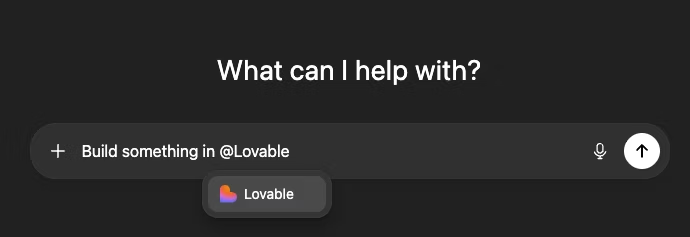
Plan your ideas in ChatGPT, then build them instantly in Lovable. The new Lovable ChatGPT app lets you turn conversations into working apps without leaving your chat. Simply tag @Lovable in any ChatGPT conversation to start building, then jump into Lovable to continue editing, iterating, and shipping your project.
Learn more about Lovable ChatGPT app.
Lovable gift cards
Give the gift of building. Lovable gift cards are now available, making it easy to gift Lovable to friends, teammates, or clients, and just in time for the holidays. Find them in Settings → Plans & credits.
Tasks
The agent now creates visible tasks while working, giving you more control and transparency over what's happening. This makes it easier to follow progress and guide longer or more complex builds. It's a step toward longer-running agents and more sophisticated planning.
Mention code files in chat
Reference specific files directly in chat by typing @ or clicking the reference button in the code editor. This makes targeted edits and discussions about specific files faster and clearer.
Project credit usage (new projects only)
Project settings now show the total credits used for each project, giving you better visibility into actual usage. Project credit totals are only available for new projects.
Verified domain workspace discovery
Business and enterprise users can now discover and request to join workspaces based on verified email domains, making it easier to find and collaborate with the right team.
Public preview link controls
Enterprise plans now have the option to disable temporary public preview link creation for workspace members, giving admins more control over how projects are shared externally. You can find this setting in Settings → Privacy & security.
Simplified SAML SSO setup
Business and enterprise plans can now configure SSO more easily by importing SAML configuration directly from a metadata URL, automatically populating all required fields instead of manually entering each value. Learn more about SSO.
Bug fixes and improvements
- Fixed issue where links in chat didn't always open in new tabs.
- Updated the publish modal to better explain what happens when you publish an app, clarifying that publishing does not expose your source code or make the app automatically remixable.