
|



This week’s system design refresher:
AI for Engineering Leaders: Course Direction Survey
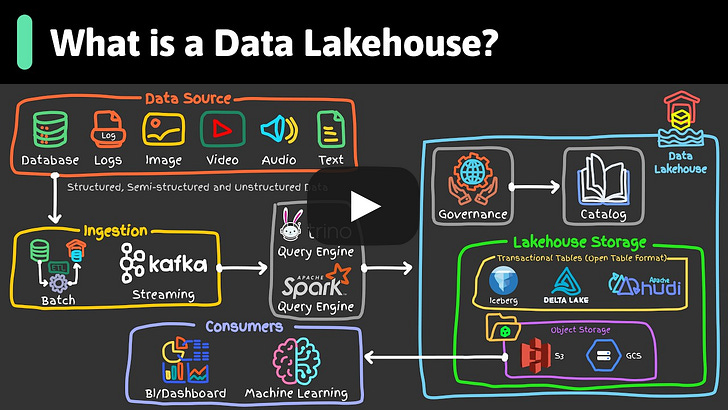
What is a Data Lakehouse? (Youtube video)
How the JVM Works
Figma Design to Code, Code to Design: Clearly Explained
12 AI Papers that Changed Everything
How Load Balancers Work?
Optimistic locking vs pessimistic locking
AI for Engineering Leaders: Course Direction Survey
We are working on a course, AI for Engineering Leaders, and would appreciate your help with a quick survey.
Before we build it, we want to get it right, so we’re asking the people who would actually take it. If you’re an EM, Tech Lead, Director, or VP of Engineering, I’d love 3 minutes of your time. This quick survey covers questions like: how do you evaluate engineers when AI writes most of the code? What metrics still matter? Where do AI tools actually help versus just add noise?
Your answers will directly shape what we cover. Thank you!
What is a Data Lakehouse?
How the JVM Works
We compile, run, and debug Java code all the time. But what exactly does the JVM do between compile and run?
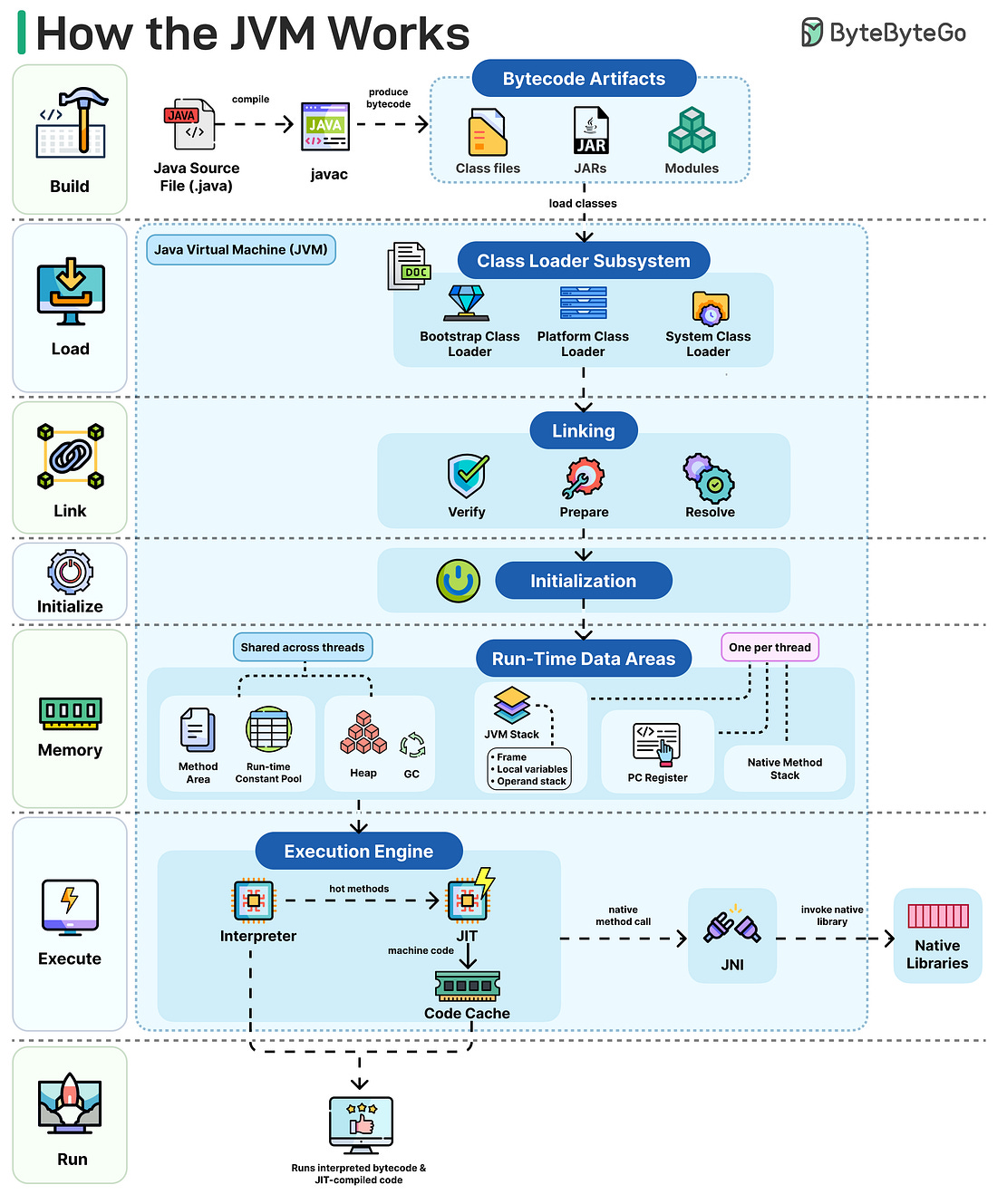 |
Here's the flow:
Build: javac compiles your source code into platform-independent bytecode, stored as .class files, JARs, or modules.
Load: The class loader subsystem brings in classes as needed using parent delegation. Bootstrap handles core JDK classes, Platform covers extensions, and System loads your application code.
Link: The Verify step checks bytecode safety. Prepare allocates static fields with default values, and Resolve turns symbolic references into direct memory addresses.
Initialize: Static variables are assigned their actual values, and static initializer blocks execute. This happens only the first time the class is used.
Memory: Heap and Method Area are shared across threads. The JVM stack, PC register, and native method stack are created per thread. The garbage collector reclaims unused heap memory.
Execute: The interpreter runs bytecode directly. When a method gets called multiple times, the JIT compiler converts it to native machine code and stores it in the code cache. Native calls go through JNI to reach C/C++ libraries.
Run: Your program runs on a mix of interpreted and JIT-compiled code. Fast startup, peak performance over time.
Figma Design to Code, Code to Design: Clearly Explained
We spoke with the Figma team behind these releases to better understand the details and engineering challenges. This article covers how Figma’s design-to-code and code-to-design workflows actually work, starting with why the obvious approaches fail, how MCP solves them, and the engineering challenges that remain.
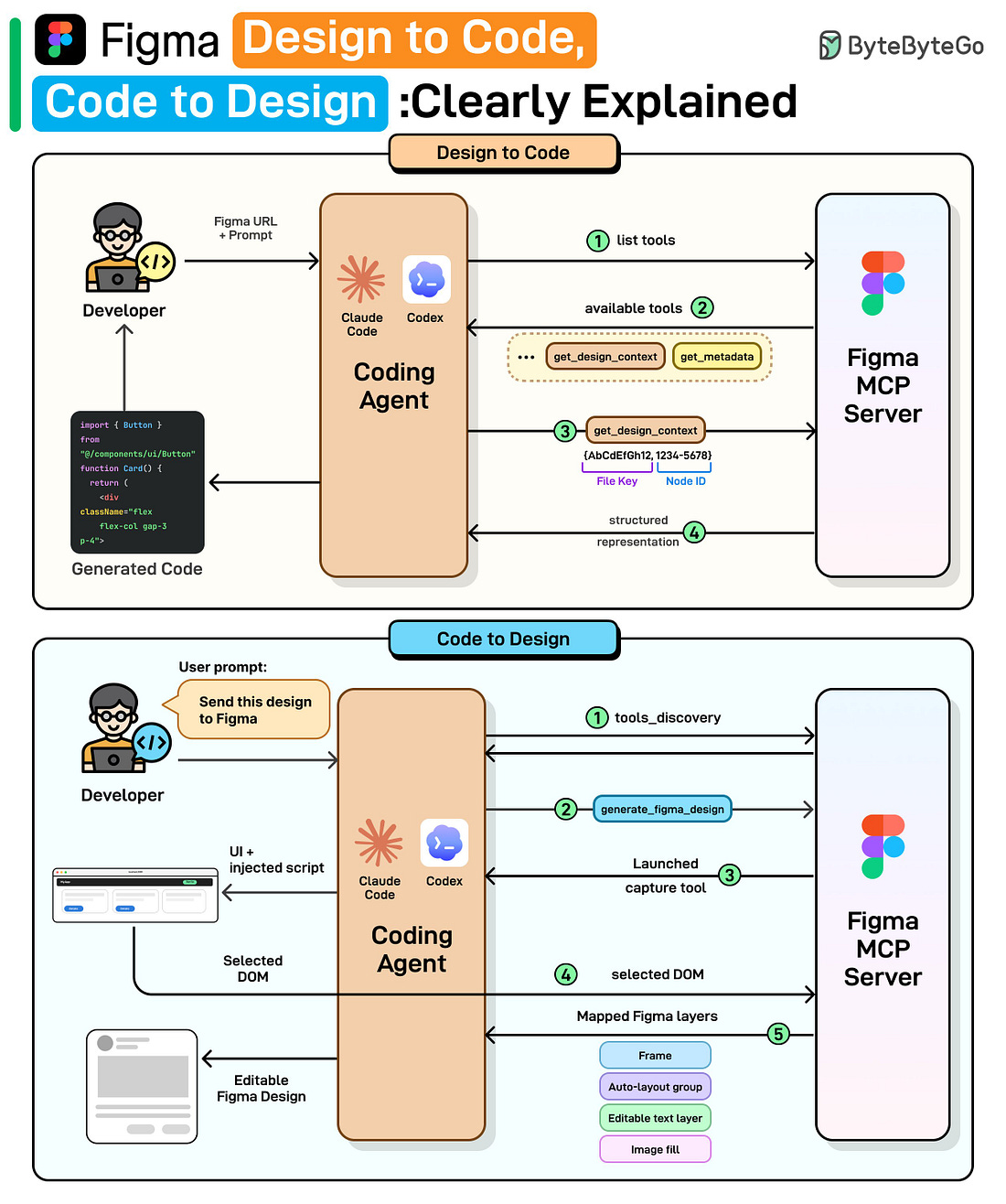 |
At the high level:
Design to Code:
Step 1: Once the user provides a Figma link and prompt, the coding agent requests the list of available tools from Figma’s MCP server.
Step 2: The server returns its tools: get_design_context, get_metadata, and more.
Step 3: The agent calls get_design_context with the file key and node ID parsed from the URL.
Step 4: The MCP server returns a structured representation including layout and styles. The agent then generates working code (React, Vue, Swift, etc.) using that structured context.
Code to Design:
Step 1: Once the user provides the desired UI code, the agent discovers available tools from the MCP server.
Step 2: The agent calls generate_figma_design with the current UI code.
Step 3: The MCP tool opens the running UI in a browser and injects a capture script.
Step 4: The user selects the desired component, and the script sends the selected DOM data to the server.
Step 5: The server maps the DOM to native Figma layers: frames, auto-layout groups, and editable text layers. The result is fully editable Figma layers shown to the user.
Read the full newsletter here.
12 AI Papers that Changed Everything
A handful of research papers shaped the entire AI landscape we see today.