|
English | Español | አማርኛ | 中文 | 한국어 | Tiếng Việt | العربية | فارسی | اردو
Dear Mantua families,
We could not be more excited for the first day of school! On this first day, we invite family members to walk their child to class. After dropping your student off, please join us in the library from 9:15 to 9:45 for a cup of coffee and a “Tears & Cheers” celebration to mark the start of a new year. We will resume typical arrival practices on Tuesday, with students walking with staff or independently to class.
We want to extend a huge thank you to our Amazing PTA for treating our whole staff to an incredible welcome-back breakfast and a sweet treat following Open House. We continued our theme of “Create the Experience” as we welcomed many of you to our Open House and Rocky Resource Fair. The alphabet-organized classroom visit sessions allowed families with multiple children to visit all classes and build more meaningful connections with staff. We hope you enjoyed meeting our team.
Thank you to the families who joined me for the first-ever Cookies and Cars event. Luckily, the rain held out and we were able to connect in person! Thank you to the PTA for quickly making a shift so this annual new-student meet-and-greet could still happen!
Looking ahead to next week:
-
Critical: Be sure to familiarize yourself with PickUp Patrol and check to make sure your child’s dismissal plan in PUP is up to date. Review with your child how they will get home from school. More detailed instructions are found below.
- At Open House, you received your student’s Emergency Care Information Sheet and Health form. Please return the completed forms to your student’s homeroom teacher.
- Get a good night’s rest and eat a good breakfast for a great start to the school year!
We wish each one of you an excellent first day of school!
Take good care,
Ms. Shannon, Mrs. Vaughan, and Mrs. Maurer
August 24: First day of school!
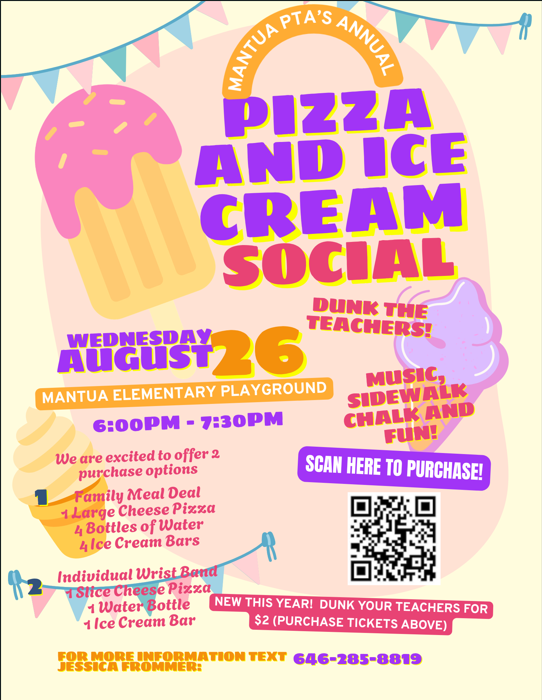
August 26: Ice Cream Social hosted by Mantua PTA, Mantua playground
6 to 7:30 PM
September 3: Woodson HS Feeder Night from 5 to 7 PM
September 4-7: Student Holiday, Labor Day weekend, schools and offices closed
Bell Schedule
Mantua ES Bell Schedule is 9:20 AM - 4:05 PM
-
Office hours are 8:15 AM- 4:45 PM. For emergencies beyond that time, please contact the office of Safety and Security at 571-423-2000.
- Kiss & Ride Drop-off is 9:05 AM - 9:20 AM
- Doors open at 9:05 AM for students
Please do not drop your child off at the school before 9:05 AM, as no supervision is provided.
Arrival & Dismissal
Safety is our priority. Please be patient as we establish arrival and dismissal routines in these first weeks. We understand how hurried mornings and evenings can be, but please drive slowly and safely through our parking lots and beyond. We have a single entrance and exit dedicated to Kiss and Ride, buses, and many walkers. If there is a line of cars waiting on Kirkwood Drive, do NOT pass the line. This presents a significant safety risk for students and families walking to and from school. The following notes help us to be safe and efficient. Please review the information below and reach out if you have any questions.
Arrival
We begin welcoming students at 9:05 AM. Please do not drop your child off early, as no adults supervise students before that time. If you arrive after 9:20 AM, please park your car and walk your student(s) to the front office through door #1.
While staff will be greeting children at Kiss & Ride until 9:20, please complete drop-off by 9:15 to ensure a prompt 9:20 start in the classroom. This allows your student time to walk to class and be in place by the time class begins. An essential part of our day in classrooms is our Morning Meeting. Being on time gives your child meaningful opportunities to build relationships with peers and staff and start the day on a positive note.
- Walkers: Staff will greet walkers at Door #1. Beginning Day 2, Tuesday, we ask parents to give hugs and well-wishes before their children enter the building. We will have many staff members to help your child find their way to class during the first weeks of school.
- Bus Riders: Students are dismissed from their buses at 9:05 AM,
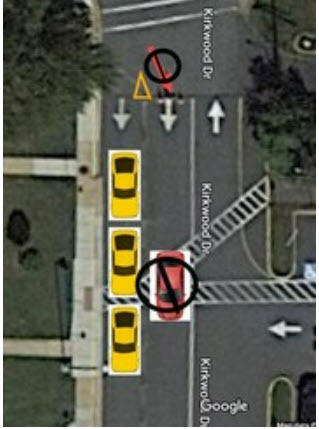
- Kiss & Ride: Staff will greet Kiss & Ride students in the loop at the side entrance near door # 2. Please be sure to pull completely forward as the staff directs you to do so. Whenever possible, please have students sit on the passenger side of the vehicle. For safety reasons, students are not to exit on the driver's side of the vehicle. Staff will assist your child's exit from the car as needed. Please remain in your car.
 |
|
This is a single-lane loop. Stay to the far right and remain in the line as you proceed through the loop. The included image is for reference. No cars should drive in the middle lane, as indicated by the red car in the image. |
Dismissal
-
Walkers will be dismissed from their classrooms. If you are meeting your walker at the end of the day, please meet them at Door #2. If you prefer to meet your child at a different exit, please make sure to discuss this arrangement with them beforehand
-
Kiss & Ride students will report to room 257 daily. If parents/guardians arrive before dismissal, students will receive notification in their classrooms and report directly to Kiss & Ride at dismissal. As you approach the Kiss & Ride loop, please have your child’s name PUP placard visible. Plan to use these placards when you come through K&R. This is how we know that the person picking up is authorized by the parent/guardian. If you need additional placards throughout the year, please let us know.
-
Bus Riders will be dismissed from their classrooms. If you are meeting your student(s) at the bus stop, please arrive at the bus stop at least 5 minutes early. Kindergarten students who ride the bus in the afternoon must be met at the bus door and asked for by name by a parent, parent designee, guardian, or a responsible sibling who is a 7th grader or older. Kindergarten students who are not met will be returned to school.
PickUp Patrol (PUP)
Registration PickUp Patrol (PUP) emails were sent to all families. To ensure that all students take the correct mode of transportation home on Monday, it is imperative that parents and guardians complete the PUP registration and update each of their children’s dismissal plans. Please visit the PUP website if you have any questions. If you need further assistance, please email Ms. Finaish at ffinaish@fcps.edu. If you have not yet created an account, we encourage you to contact Ms. Finaish for a one-time link to set up your account. The link expires for security purposes, so once you receive the link, you should create the account immediately. For those families whose default is Kiss and Ride, pink car tags will be issued to your child’s classroom on Monday. Please display this car tag on your dashboard when you come to pick up your child.
The student default plans you enter in PUP will become visible to the main office and to the individual teacher. If a student needs to leave school during the day, families will update their child's dismissal plan using the app. This information is then communicated to the teacher and main office staff. At the time of pick-up, the parent/guardian will come to the office to pick up the child.
Key Points to Remember
- All children must be signed out in the office (late arrivals, early dismissal, re-entry).
- A student CANNOT be released to anyone except the parent/guardian or the emergency contact indicated on the emergency care card. Parents/Guardians can consent to release their child to a different adult by changing their child's dismissal plan in the PUP app. Please know that if the person picking up a child is unknown to the staff, identification will be required.
- Changes to the default plan must be made before 2 PM daily.
- You can make changes in advance for planned changes to the student’s schedule.
- No dismissals can occur within 20 minutes of the end of the school day.
- If you have questions while using the application, please check the PUP FAQ page. If you need further assistance, please contact Ms. Fadwa Finaish at ffinaish@fcps.edu or PickUp Patrol at support@pickuppatrol.net.
Attendance
We will also continue using PUP for absence reporting. If your child is either going to be absent for the entire day or late for any reason, please report the absence in PUP or email MantuaElem.Attendance@fcps.edu before 9:30 AM on the day of the absence.
- Reasons for Excused Absence and Tardy include: illness of the student, death in the family, doctor or dentist appointment, or absence on a day of observance.
Medication Forms & Drop Off
The Health Room continues to be open for drop-off of emergency and daily prescription medications. Medications may be dropped off after the start of school, M-F, 9 AM - 4 PM. All visitors are required to check in at the Main Office. All medications require a completed medication authorization.
A parent or designated adult must transport all prescription medications to school. Students are not allowed to bring in prescription medications. Prescription labels must include a description of the medication.
Mantua PTA Ice Cream Social
One of our favorite celebrations, the Mantua PTA Ice Cream Social will be held on August 26th from 6 to 7:30 PM on the Mantua playground! Please purchase pre-sale tickets using the QR code above to help with meal planning. This is a great way to connect with your Mantua community!
Additionally, if you would like to volunteer at the event, please use the sign-up link here: Ice Cream Social Volunteer Signup Genius
New Student Device Requirement
Starting this school year, students may only use FCPS-issued devices for school-related digital activities during the instructional day. This is in accordance with a new School Board requirement, approved on July 16, which states that students may not use personal electronic communication or computing devices, including personal laptops, tablets, smartwatches, smartphones, and similar devices.
Students may only use a personal device if it is required as part of a necessary accommodation in the students’ Individualized Education Program (IEP) or Section 504 Plan. A principal or the principal’s designee may approve a limited, course-specific exception for students enrolled in a specialized class when the curriculum requires a technology tool or software that isn’t available on a standard FCPS-issued device.
Families can help support this requirement by reminding students to bring their FCPS-issued device each day and use it for all school-related digital activities unless an approved exception applies.
Study Help and Support Available to Students in Schoology
A new Schoology Study and Support Hub is available for students in Schoology. This space was developed by the FCPS Educational Technology Team with input from students. It is designed to provide essential study tools and academic support resources directly to our learners.
Students can log in to Schoology and read their Schoology announcements or watch this video on the support hub for more information.
Help Your Child Navigate the Lunch Line
Check out some tips to help your child get through the lunch line quickly and have more time to eat:
- Teach your child their student ID number to receive meals at school.
- Sign up for and add money to MySchoolBucks to purchase meals at school.
-
Apply for free and reduced-price meals. Students who were approved for free and reduced-price meals last year are eligible for the first 30 days of school this year (or until a new application is processed). Families should submit a new application as soon as possible, so eligible students continue to receive meals at no cost.
If your child has any food allergies, learn how to submit accommodations for dietary restrictions and allergens.
Access menus for breakfast, lunch, and other school meals, as well as allergen and nutrition information.
You Can Manage Student Web Access at Home
At Mantua, we acknowledge that parents are our students' first and most important teachers. Parents now have greater control over their child’s FCPS-issued device outside of school hours through Lightspeed Parent Portal.
In addition to monitoring weekly internet activity, parents can now also customize web access at home on FCPS devices through Lightspeed using Schedules and Web Rules.
With Schedules, you can set tailored times to automatically pause or restrict internet access. This makes it easier to enforce rules around homework time, family dinners, weekends, or bedtime.
In Web Rules, you can create Custom Block Lists to block specific, individual websites they do not want your child accessing at home. This allows parents greater control over what is happening online, under their own roof.
These new custom controls take effect at home, outside of school hours, and when the device is off the FCPS network. They will not override standard district filtering policies during the instructional day.
Customize Your Lightspeed Settings
All parents should be receiving weekly Lightspeed Online Student Activity Report emails. To set up these new features, click the “Log in or Register” button at the bottom of your weekly Lightspeed Online Student Activity Report email.
Visit the FCPS Lightspeed Parent Portal Guide for more information. If you have additional questions, submit a Parent Technology Support Ticket.
Parents are encouraged to discuss internet boundaries with their children so that they can understand the reasoning behind any limits and the differences between access at home and at school. Get tips on talking to your children about technology safety.
Update Your Child’s Immunizations and Records
Please check with your healthcare provider as soon as possible to make sure your child is up-to-date on the immunizations required by the state of Virginia. Prior to the start of school on Monday, August 24, please submit your child’s immunization documentation. If your child has an appointment to receive their required immunizations after August 24, please submit an Immunization Action Plan to confirm the appointment.
You can check your child’s immunization compliance and submit their immunization record in SIS ParentVUE. Records may also be delivered to a school’s front office. If needed, families may also provide other immunization documentation including a healthcare provider’s written statement of a permanent or temporary medical exemption or a notarized Religious Exemption Form. Please visit the FCPS How to Submit Immunization Documentation webpage for step-by-step instructions on how to submit each of these items.
Immunization Events for FCPS Students
FCPS, in partnership with Inspire Health Alliance, will be providing school-required immunizations and optional flu shots for all FCPS students, ages 18 and under, with no out-of-pocket costs. Multiple events will take place at designated FCPS locations. Additional dates will be made available throughout the school year. Parents or guardians may view upcoming events and schedule an appointment for their student. Participation is voluntary.
Additional immunization resources are also available.
FCPS Bus Transportation ID Cards
Later this week, we will begin distributing student ID cards to all our students who ride the school bus or use FCPS transportation services. This is a soft rollout as we work to understand the new system and establish best practices.
Students who have received student ID cards should begin tapping as they board and exit the bus. Only students who use FCPS transportation services will be provided with a student ID card at this time.
We ask for your patience! Bus drivers will begin checking in students next week and may need some extra time at each bus stop while they do this. The transportation team is working hard to minimize any potential delays.
Learn more about the bus navigation and student ID cards.
New ParentVUE Mobile App Now Available
FCPS families can now download the new ParentVUE mobile app from the Apple App Store or Google Play Store. The updated app offers a more secure sign-in experience and includes the option to enable multi-factor authentication for added account security. The current ParentVUE app will continue to work for approximately six months, but families should download the new app by December 2026 to ensure uninterrupted access to their student's information. Learn more about the new app and installation instructions on the FCPS website. Parents who need assistance can submit a |